
One file per matter
People, children, marriage, separation and valuation dates, documents, tasks and notes behind one click. Private matters can be hidden from everyone except the person who opened them and the administrator.
Coming soon For family law offices · Windows
Hearth keeps your matters, financial statements, property equalization, support calculations, official court forms and client reports in one plain program that your whole office can use. No cloud, no subscription, and no one else holds your client files.

What it does
Large type, short help notes at the top of every screen, and nothing hidden in menus, so staff who are not technical can find their way without training.
People, children, marriage, separation and valuation dates, documents, tasks and notes behind one click. Private matters can be hidden from everyone except the person who opened them and the administrator.
Enter amounts weekly, monthly or yearly and Hearth converts them. Assets and debts feed the net family property and equalization calculation under the Ontario Family Law Act.
The Federal Child Support Tables in force from October 1, 2025, for every province and territory, with shared parenting set-off and section 7 expense shares.
Low, middle and high ranges with and without children, with the assumptions shown, saved to the matter in one click.
145 Ontario Family Court forms with their guides and the Divorce Act and Justice Canada materials. Ontario Word forms fill from the matter; about 600 forms for the other provinces download on request.
A clear, printable summary a lawyer can hand to a client: their situation, income, property, support estimates, next dates and account balance. Save it as PDF or Word.
Retainer letter, disclosure request, separation agreement and marriage contract outlines. Details fill in automatically; edit and save as Word.
Court dates and deadlines from every matter in one list, time logging, invoices with tax, unpaid invoices and a trust ledger for each matter.
No account, no cloud, nothing uploaded. Scheduled backups to this computer and a second drive, one-click restore, a record of who changed what and a full export at any time.
Real screens
Every screen here shows a fictional family. No real client information appears anywhere on this site.
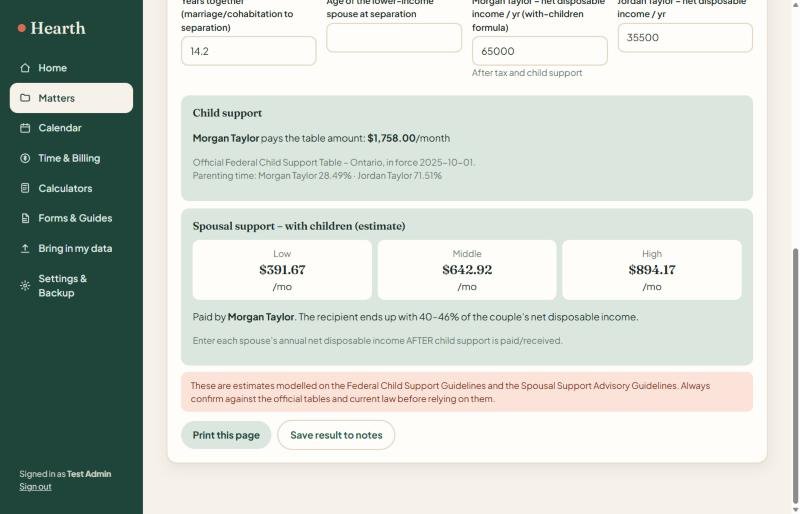
Results update as you type. Incomes and children are copied from the matter, and the table for the chosen province is built in.
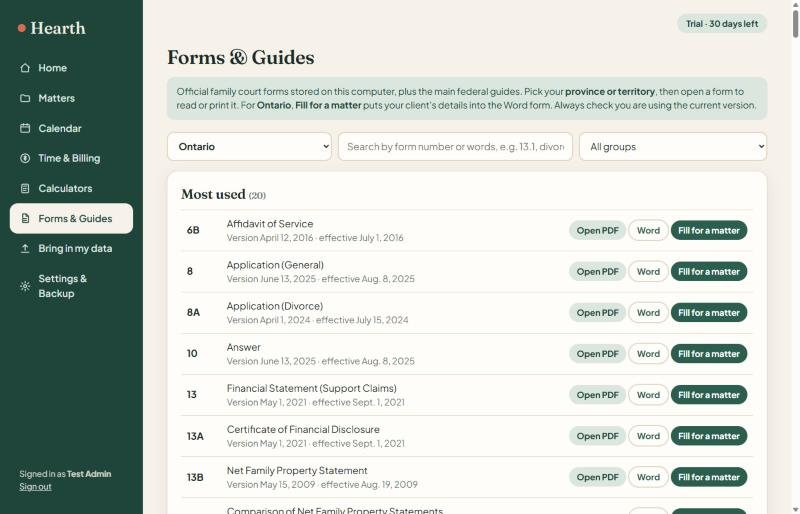
Open the PDF, take the Word version, or fill the form from a matter. Court file number, parties, lawyers, dates and income and expense totals are filled in; the rest is left for the lawyer to complete.
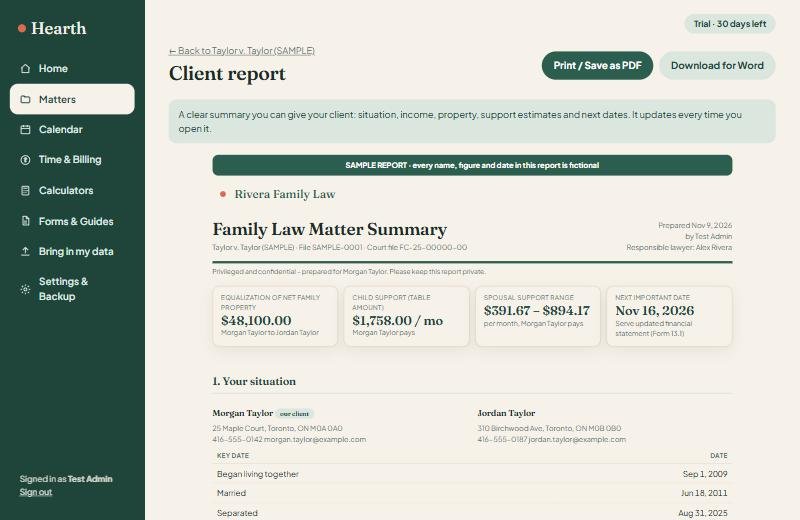
Headline figures first, detail after. See a full sample report built from a fictional family.
Moving over
DivorceMate does not publish an export tool, so the move uses what your office can get out of it. Nothing in the old program is changed.
Request a spreadsheet (CSV or Excel) of matters and client contact details from DivorceMate support. It is your data.
Choose the file in Hearth. Columns are matched automatically and can be corrected before anything is added. A backup is made first.
Point Hearth at the folder of matter documents. Each file is stored with the matching matter.
Figures kept inside the old program are not part of a client list, so financial statements and support figures are re-entered or taken from printouts.
Launch plan
Hearth works today in its pilot version. Before the public launch, each step below is carried out with the first offices, so the program is checked against real files and not only our own examples.
One computer gets Hearth and the 30-day trial, with a sample matter to look at straight away.
The office exports its client list; Hearth matches the columns and imports a copy.
A lawyer compares equalization, child support and spousal support results with the figures the office already trusts.
Fill the forms your office files most often and compare them with what the court expects.
Choose the second drive or network folder, run a backup and practise a restore.
A short session for lawyers and assistants, with a one-page quick guide.
The installer is finished and licence keys are prepared. Pricing and terms are confirmed in writing.
Hearth is installed on each computer, keys are entered, and the office carries on working.
No launch date is promised until the pilot is complete. Early-access offices are told first.
Planned launch pricing
Try everything free for 30 days. If it earns its place on your desk, buy a licence for that computer. Prices are in Canadian dollars and will be confirmed at launch.
CA$995 + tax, once, per computer
Not on sale yet. Questions? admin@4cdigital.com
If the trial ends first, Hearth becomes view-only: every file can still be opened, printed, exported and backed up, and nothing is deleted.
Questions
Soon, but we are not giving a date until the pilot offices have checked it against real files. Join the early-access list and you will be told first.
Yes. Yes. Hearth runs on one Windows computer in your office and keeps every file there. Nothing is uploaded and there is no account. Your data is backed up on a schedule to that computer and to a second drive, USB stick or network folder that you choose. In this first version a licence covers one computer; it does not share files between computers.
It is designed to cover the same everyday work: matters, financial statements, property sharing, support calculations, forms and reports. You bring in your client list from a spreadsheet export. Calculations kept inside the old program are re-entered, so keep it until you are comfortable.
The child support tables cover all 13 provinces and territories. Property equalization is built for Ontario. Court forms: 145 Ontario forms are built in and fill from the matter, and about 600 forms for other provinces download on request. Some courts block automatic downloads, so for those Hearth opens the official page instead.
Calculations and reports are estimates for the responsible lawyer or mediator to review. They are not legal advice. The child support tables were checked against the official Justice Canada tables, and part of the launch plan is a check against figures your office already trusts.
Hearth becomes view-only. Every file can still be opened, printed, exported and backed up, so your data is never held hostage. Adding or changing information resumes once a licence key is entered.
Possibly. New publishers are shown a "Windows protected your PC" notice until they have bought a code-signing certificate. Choosing "More info", then "Run anyway", continues the install. Signing the installer is on the launch plan.
No. Hearth is made by 4C Digital and is not affiliated with or endorsed by DivorceMate, LEAP or any court. Court forms are published by their respective courts and ministries; the child support tables are published by the Department of Justice Canada under the Open Government Licence - Canada.
Be first in line
We will set up your pilot copy, with a 30-day free trial and a fictional sample matter to look around before any real files go in. A person reads every message.